
How to use UndaBreath
A short guide to using the app
Getting Started
UndaBreath asks one question, "What do you need?", and each answer is a preset that sets the breathing, the music, the nature sounds and the photos for you.
Pick a preset, pick a length, press Begin. Everything else waits under Adjust breathing, sound and nature, closed until you open it.
Anyone can choose a preset, set the length, and use the Mix and Nature sliders. The settings marked Pro in this guide are part of UndaBreath Pro: on the free player they show faded, with a small Pro mark. Your settings are remembered on the device you use.
While a session plays, you can change anything. The current breath stretches or shrinks in place and the music follows, so the sound never breaks.
Presets
There are six presets, one for each answer to "What do you need?". Choosing one starts a session after a short count-in; choosing another while one plays switches over during a fresh count-in, without a break in the sound.
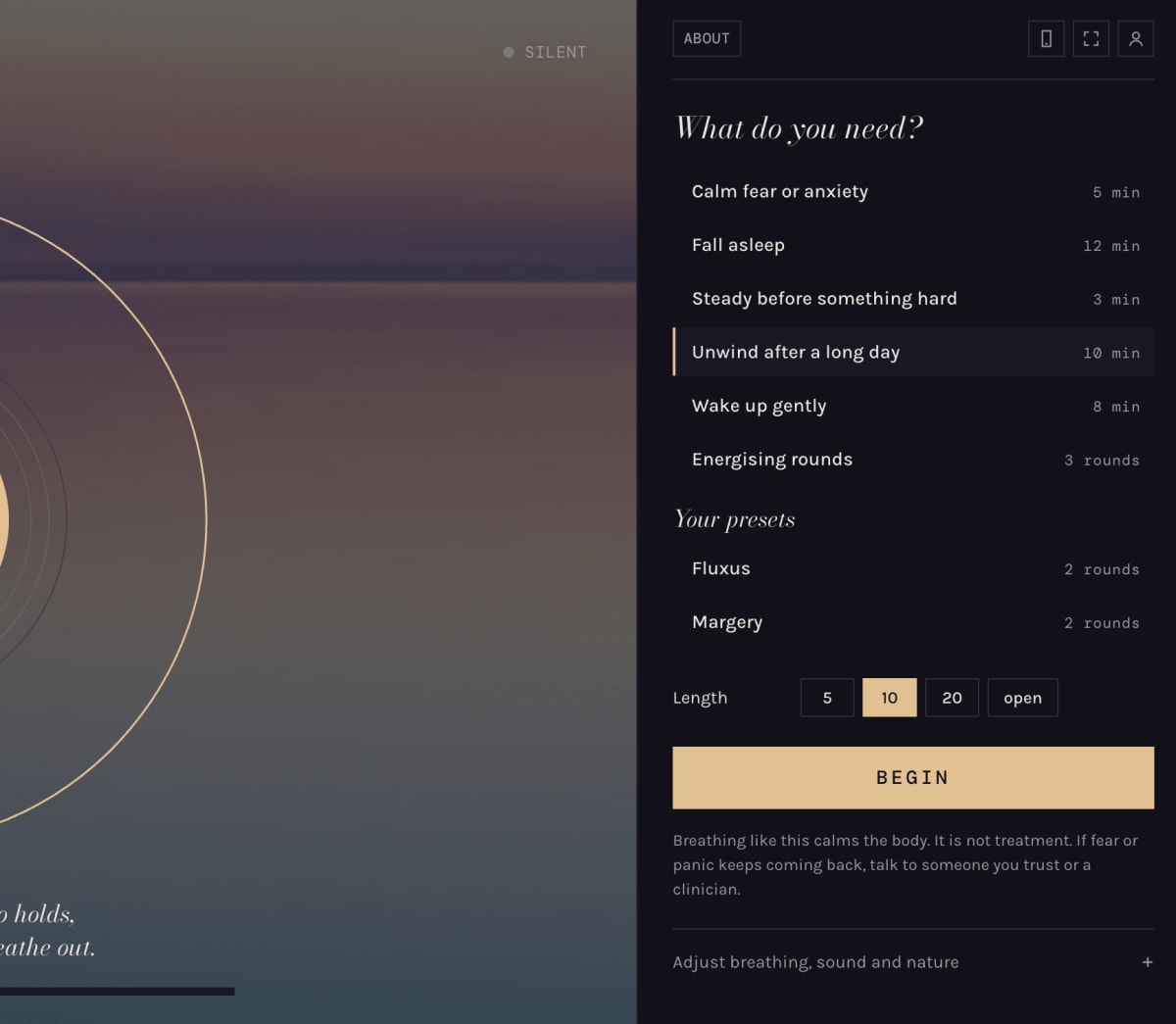
| Preset | Breathing | Sound | Lengths (minutes) |
|---|---|---|---|
| Calm fear or anxiety | Resonance: in for 4, out for 6. The out-breath is longer than the in-breath | Soft count, a stream beside you, warm major key | 3, 5, 10; open is Pro |
| Fall asleep | Starts with slow, even breaths, then settles into 4-7-8 and slows further toward the end | Rain arrives as the music darkens; no tick | 8, 12; 20 is Pro |
| Steady before something hard | Box: in 4, hold 4, out 4, rest 4 | Counted, a bell on every breath, no piano | 2, 3, 5 |
| Unwind after a long day | Coherent: in 5.5, out 5.5, no holds (about six breaths a minute) | Ocean waves that break as you breathe out | 5, 10; 20 and open are Pro |
| Wake up gently | Starts slow and quiet, then lifts step by step | Crickets, then a stream and a bell as the music brightens | 5, 8; 12 is Pro |
| Energising rounds | Rounds of thirty full breaths, then a hold with lungs empty and one deep breath held | Light wind, a firm tick, piano over the holds | Set by rounds, not minutes |
Fall asleep and Wake up gently are journeys: they change pattern, key and nature sounds as they go, and stretch or shrink to the length you choose. "Open" means the session keeps going until you stop it.
Length, rounds and Begin
- Length: how long the session runs. Each preset offers its own lengths (see the table above). A timed session ends at the end of a breath, with three bells and a slow 20-second fade. A thin bar under the orb shows how far you have come.
- Rounds (Energising rounds only): 1, 2 or 3 rounds; a fourth round is Pro.
- First hold (Energising rounds only): how long the first hold with lungs empty lasts: 30 or 60 seconds; 90 seconds is Pro. Each hold after it runs 15 seconds longer. Press End hold early whenever you need to, or just breathe.
- Begin: starts the session after a 5-second count-in, with a soft tick each second so you can settle. You can also tap the orb or press the space bar to start and stop.
On phones the screen stays on while UndaBreath plays. Locking the phone can stop the sound. Play, pause and stop also appear on the lock screen.
Your presets (Pro)
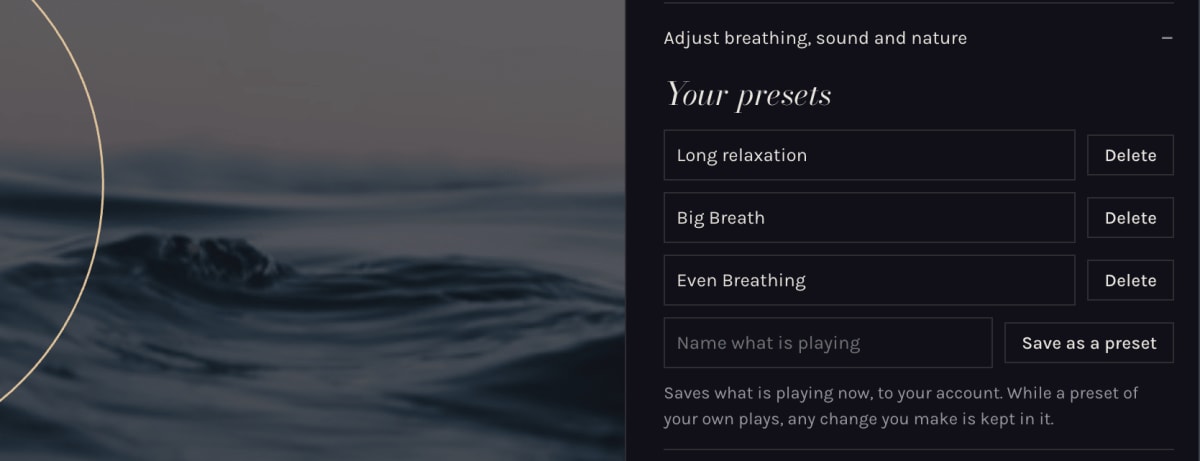
Save what is playing as a preset of your own, with every setting as it stands: pattern, music, mix, nature and length. Type a name under Your presets, the first group in Adjust, and press Save as a preset.
- Your presets are listed under the six built-in ones, ready to choose like any other.
- While one of yours plays, any change you make is kept in it.
- Rename or delete them from the same group. The six built-in presets can't be changed.
- Signed in to UndaBreath Pro, your presets follow your account to other devices.
Breathing (Pro)
Choose a breathing pattern, or set your own timings.
| Pattern | In | Hold | Out | Rest |
|---|---|---|---|---|
| Box | 4 s | 4 s | 4 s | 4 s |
| 4-7-8 | 4 s | 7 s | 8 s | none |
| Coherent | 5.5 s | none | 5.5 s | none |
| Resonance | 4 s | none | 6 s | none |
| Release | 4 s | 2 s | 8 s | 2 s |
| Lift | 4 s | 2 s | 4 s | none |
| Custom | your own | your own | your own | your own |
- Inhale, Hold, Exhale, Rest: each phase in seconds. In and out run from 1 to 12 and 16 seconds; hold and rest can be 0, which skips them.
- Pace: stretches or shortens every phase together, from 0.5× to 2×. Above 1.00× each breath is longer and slower; below it, shorter and quicker.
Energising rounds (Pro)
These show when the Energising rounds preset is chosen.
| Setting | Range | Default | What it does |
|---|---|---|---|
| Breaths | 20 to 40 | 30 | Power breaths per round |
| Breath speed | 1.2 to 2.4 seconds | 1.6 | Seconds for each half of a power breath. Higher is slower |
| Hold full | 10 to 20 seconds | 15 | How long you hold after the deep breath in |
Each round runs: the power breaths, breathe out and hold with lungs empty, one deep breath in, hold with lungs full, then let it go for 6 seconds. The music climbs through the power breaths and settles in the hold. About 15 seconds before a long empty hold ends, the chord lifts as a cue that the breath in is near.
Sit or lie down. Never do this in or near water, or while driving. Light-headedness and tingling are common; stop if you feel unwell.
Music (Pro)
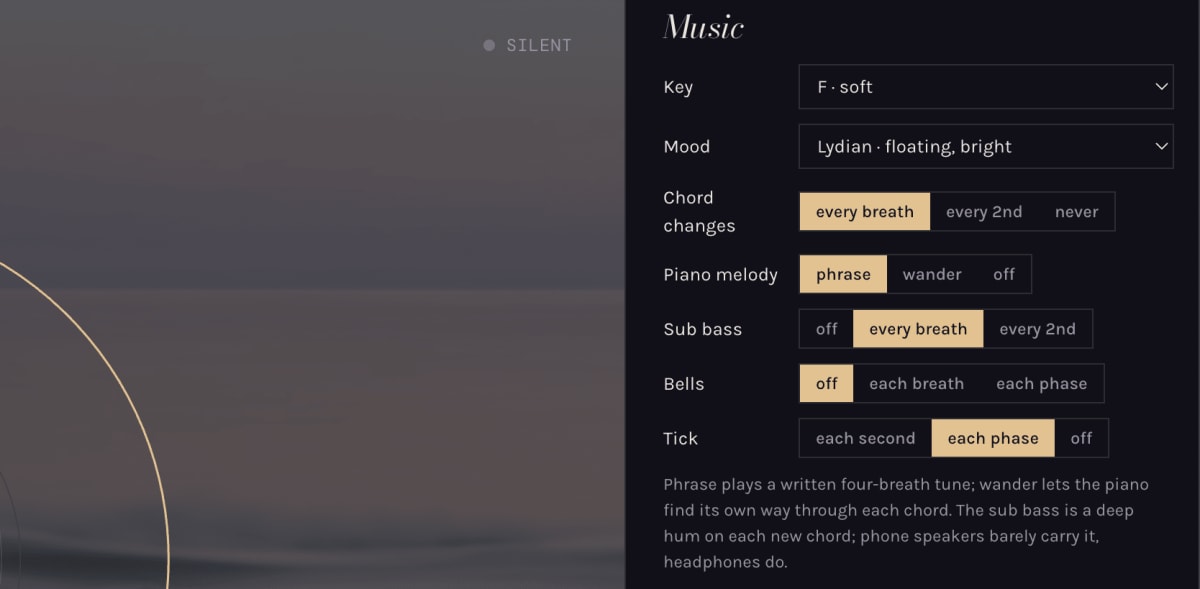
| Setting | Choices | What it does |
|---|---|---|
| Key | C low, D warm, E open, F soft, G bright, A lifted | The home note of the music. Lower keys sound deeper and darker |
| Mood | Major (warm, settled), Lydian (floating, bright), Mixolydian (warm, open), Dorian (gentle minor), Aeolian (still, minor) | The scale the music is built on |
| Chord changes | every breath, every 2nd, never | How often the chord moves on |
| Piano melody | phrase, wander, off | Phrase plays a written four-breath tune. Wander lets the piano find its own way through each chord. Off turns the piano off |
| Sub bass | off, every breath, every 2nd | A deep hum on the new chord as a breath begins. Phone speakers barely carry it; headphones do |
| Bells | off, each breath, each phase | A bell as each breath begins, or on every in, hold, out and rest |
| Tick | each second, each phase, off | A soft counting tick |
Every preset turns the sub bass on. Choosing a preset sets all of these back to that preset's own.
Mix
The Mix sliders are open to everyone. Each runs from 0 to 100.
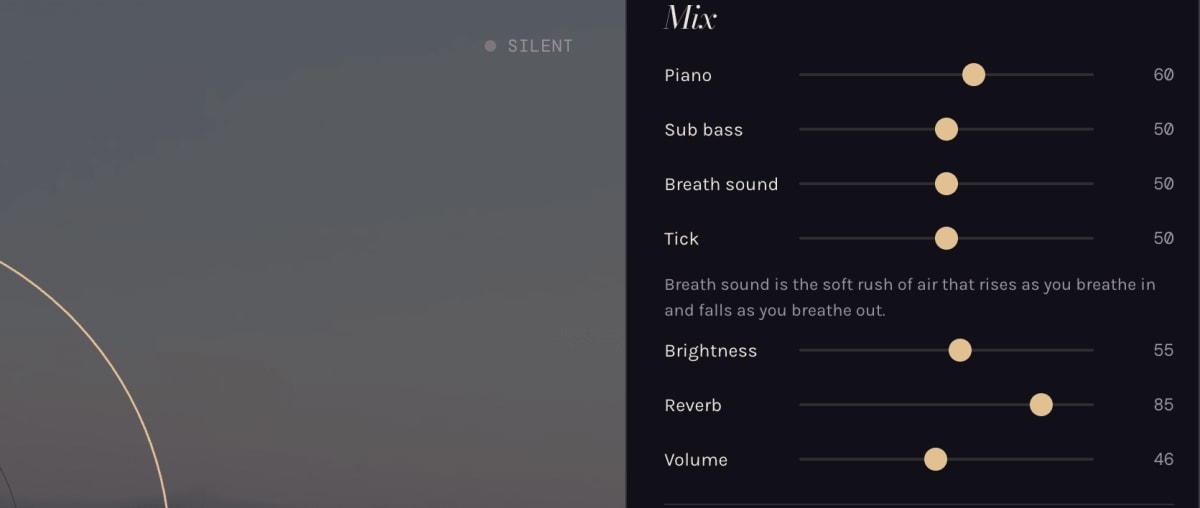
| Slider | Starts at | What it does |
|---|---|---|
| Piano | 60 | How loud the piano melody is |
| Sub bass | 50 | How loud the deep hum under each breath is |
| Breath sound | 50 | The soft rush of air that rises as you breathe in and falls as you breathe out |
| Tick | 50 | How loud the counting tick is |
| Brightness | 50 | The tone of the whole sound: lower is darker and softer, higher is clearer |
| Reverb | 60 | How much room the sound has around it: higher is more spacious |
| Volume | 80 | Everything together |
Presets set their own starting levels, so these numbers move when you choose one.
Nature
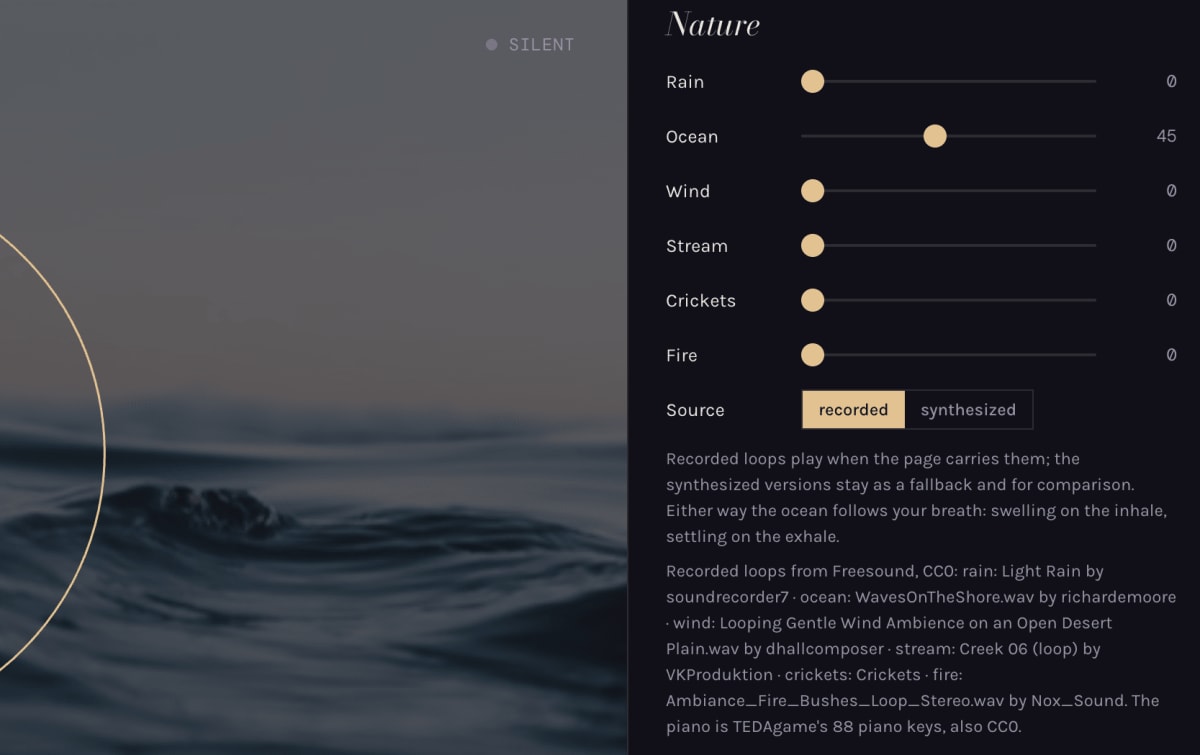
Six nature sounds, each with its own slider from 0 to 100, open to everyone: Rain, Ocean, Wind, Stream, Crickets and Fire. Mix as many as you like. The ocean follows your breath, swelling on the in-breath and settling on the out-breath.
Source switches between recorded loops and synthesized versions of the same sounds. Recorded is the default; synthesized is there for comparison and plays if a recording can't load.
More sound (Pro)
Drift (off, on) lets the sound change slowly on its own. It moves the piano, breath sound, brightness, reverb and nature sliders while you breathe, gliding to new levels and resting there a while. It keeps them gentle: breath sound never goes above 45 and nature never above 20. Move a slider yourself and drift leaves that one alone for a while.
Binaural beat is a slow pulse felt between the ears, named for the brain rhythm it matches. It needs headphones; through speakers it does nothing.

| Choice | Band | Beat |
|---|---|---|
| Off | none | none |
| Sleep | delta | 2 Hz |
| Deep rest | theta | 6 Hz |
| Calm focus | alpha | 10 Hz |
Extras (Pro)
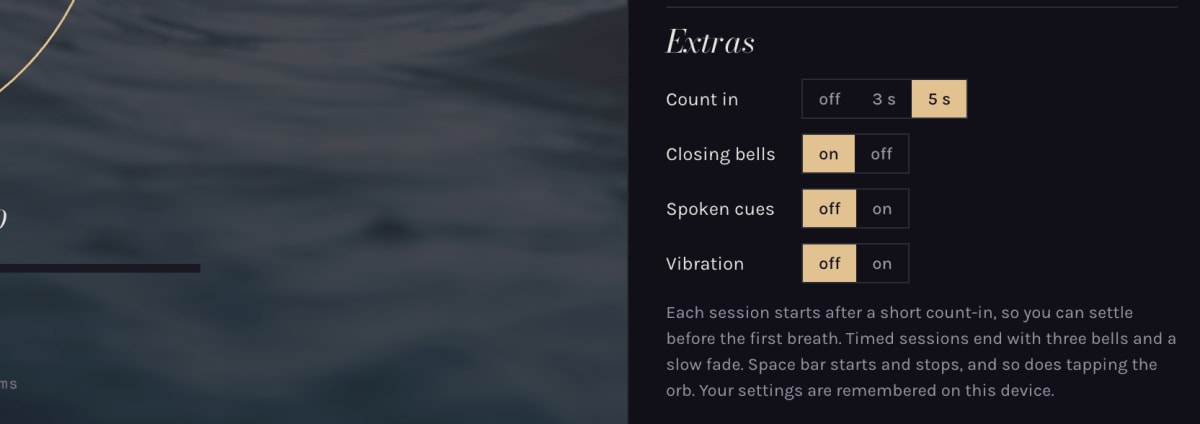
| Setting | Choices | What it does |
|---|---|---|
| Count in | off, 3 s, 5 s | The pause before the first breath, with a soft tick each second so you can settle. 5 s by default |
| Closing bells | on, off | Three bells as a timed session ends. The sound fades slowly either way |
| Spoken cues | off, on | A voice says "Breathe in", "Hold", "Breathe out" and "Rest", plus "Get ready" at the start. Shown only where the browser can speak |
| Vibration | off, on | A double buzz as you breathe in, a single one at each other phase. Shown only on devices that can vibrate (most Android phones, not iPhones) |
The space bar and a tap on the orb start and stop a session whatever these are set to.
The top row
The row above "What do you need?" holds links on the left and icons on the right. Hover an icon to see its name.
- About: what UndaBreath is.
- Upgrade to Pro: UndaBreath Pro and what it adds.
- Open on your phone (computers only): shows a QR code to scan with your phone. Signed in, it signs your phone in too; the code works once and lasts three minutes.
- Install: adds UndaBreath to your home screen or dock, so it opens like an app and plays offline. Where the browser has no install prompt (iPhone Safari, for one), it shows where the browser keeps the option.
- Fullscreen: fills the screen with the orb and photos. iPhone Safari has no fullscreen, so it is hidden there.
- Account: sign in, or open your account once you have.